

Real estate lead management software that never lets an enquiry go cold
Every enquiry your projects get, from Facebook and Instagram ads, Google Ads, property portals, your website and walk-ins, lands in one list within seconds. Duplicates are caught by mobile number, each lead goes to the right salesperson, and the CRM reminds them until the buyer books or says no.
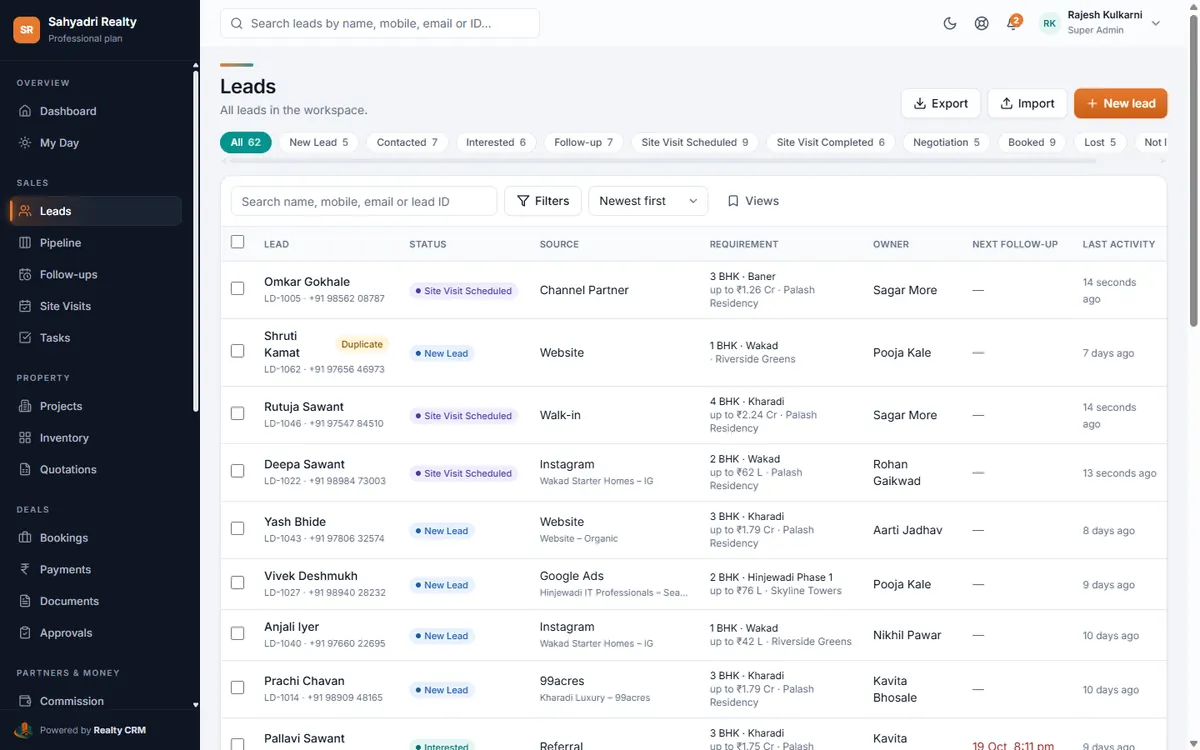
Every source in one list
Leads arrive on their own from connected sources, or in bulk from an Excel file. Each one keeps where it came from, so reports can tell you which campaign, ad or portal sells.
- Facebook and Instagram lead ads, Google Ads lead forms and your website forms
- Property portals that can post to a webhook, and Excel imports for everything else
- Walk-ins and calls added by hand in seconds, on the web or in the Android app
- Campaign, ad set and ad name stored on every lead from ads
Duplicates handled the way you want
When the same buyer enquires again, the CRM matches them by mobile number (and email, if you choose). You decide whether the new enquiry is merged into the existing lead, flagged as a duplicate, or handed to the salesperson who already owns the buyer.
A clear pipeline from enquiry to booking
Each lead moves through stages: new, contacted, interested, follow-up, site visit scheduled and completed, negotiation, booked, or lost with a reason. The pipeline board shows where every buyer stands, and the lead page keeps the whole history: calls, WhatsApp messages, visits, cost sheets and notes.
Automated follow-ups
Under Settings → Lead automation you can switch on, step by step:
- A welcome message on WhatsApp or email as soon as a lead arrives
- A first-call follow-up for the salesperson the lead is assigned to
- Re-assignment to the next person if nobody calls in time
- Follow-up messages on the days you choose, for example day 1, 3, 5, 9 and 20
Set it up, step by step
Questions about lead management
Can I import the leads I already have?
Yes. Upload an Excel file with names and mobile numbers (and anything else you have, such as budget, BHK or location). Duplicates are checked during the import, and leads can be assigned automatically or left for you to assign.
What happens when a lead arrives at night or on a Sunday?
It is saved straight away and assigned when office hours start, so the first call reminder lands when your team is working. You set the working days and hours for your workspace.
Is there a limit on leads?
Each plan includes a number of leads per month. Leads over the limit are still saved and marked, never dropped, and you can upgrade at any time from Plan & billing.
More of Realty CRM
Facebook & Instagram leads
Connect Facebook and Instagram lead ads to your real estate CRM. Leads arrive within a minute, in the right project, with the campaign and ad they came from.
Automatic lead assignment
Assign real estate leads automatically by round robin, project, location or campaign, within office hours, and move them on if nobody calls in time.
WhatsApp automation
WhatsApp in your real estate CRM: one-tap chats from every lead, approved templates for welcomes, site visit reminders, payment reminders and booking confirmations.
Sales analytics & reports
Dashboards, targets and 13 reports for real estate sales: lead sources, campaign ROI, executive performance, site visits, bookings, collections and the funnel.