

Real estate sales management with dashboards, targets and reports
Owners and sales heads need the numbers without asking anyone. Realty CRM's dashboards and reports show where leads come from, which campaigns pay back, how each salesperson is doing, and what has been booked and collected.
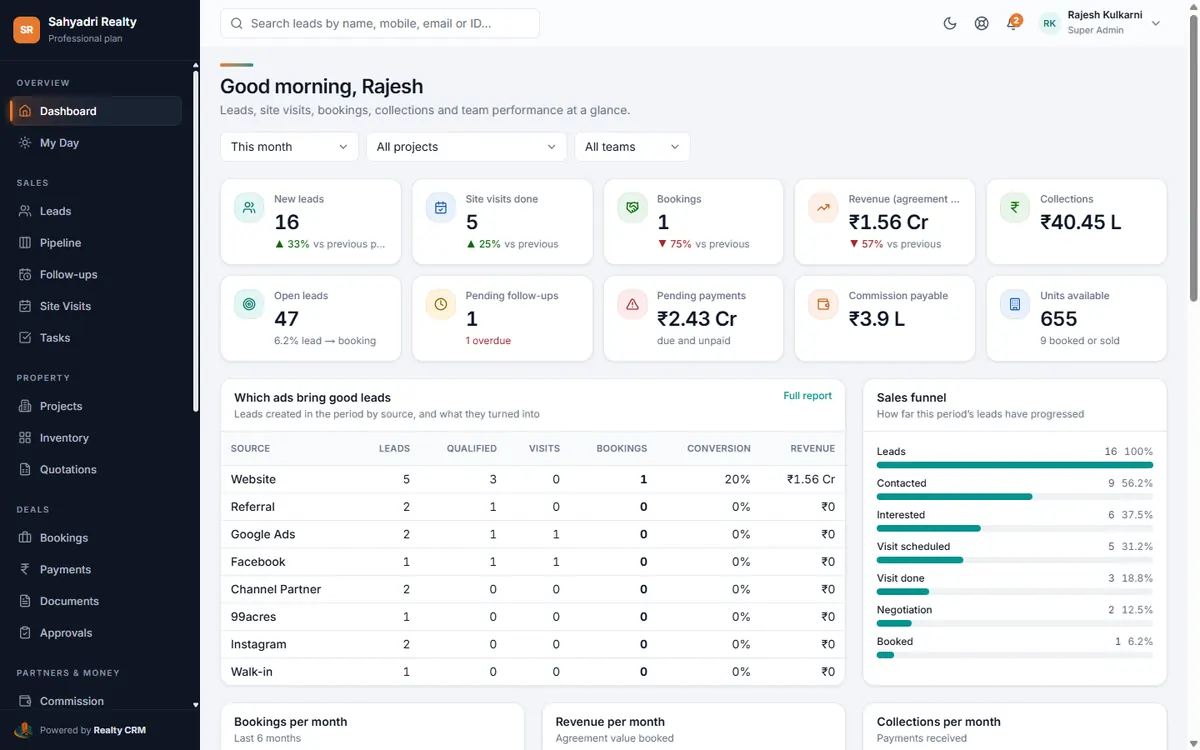
Dashboards for every role
Management sees bookings, revenue, collections and the funnel; each executive sees their own leads, follow-ups, visits and targets.
Reports that answer real questions
Filter any report by dates, project, source and executive, and export it to Excel or PDF.
- Lead source and campaign ROI, with cost per lead and per booking
- Sales executive activity and results; follow-ups done on time
- Site visits with GPS check-in; bookings, revenue and pending payments with ageing
- Commission, project-wise sales, inventory, lost leads and the conversion funnel
Targets and scheduled reports
Set monthly targets for people and teams, and have reports emailed on a schedule.
Set it up, step by step
Questions about sales analytics & reports
Can managers see only their own team?
Yes. Roles decide whether someone sees their own, their team's or all data, in reports as well as lists.
More of Realty CRM
Lead management
Real estate lead management software: every enquiry from ads, portals, your website and walk-ins in one list, duplicates caught, follow-ups automated.
Facebook & Instagram leads
Connect Facebook and Instagram lead ads to your real estate CRM. Leads arrive within a minute, in the right project, with the campaign and ad they came from.
Payment collection
Track every booking's instalments, receipts and dues, send payment reminders automatically and see overdue amounts with ageing, in your real estate CRM.