

Site visit management with GPS check-in
A site visit is where most homes are sold. Realty CRM books the visit, reminds the buyer, lets the salesperson check in at the site from the Android app, and shows the manager how far each check-in was from the project, so every visit is on record.
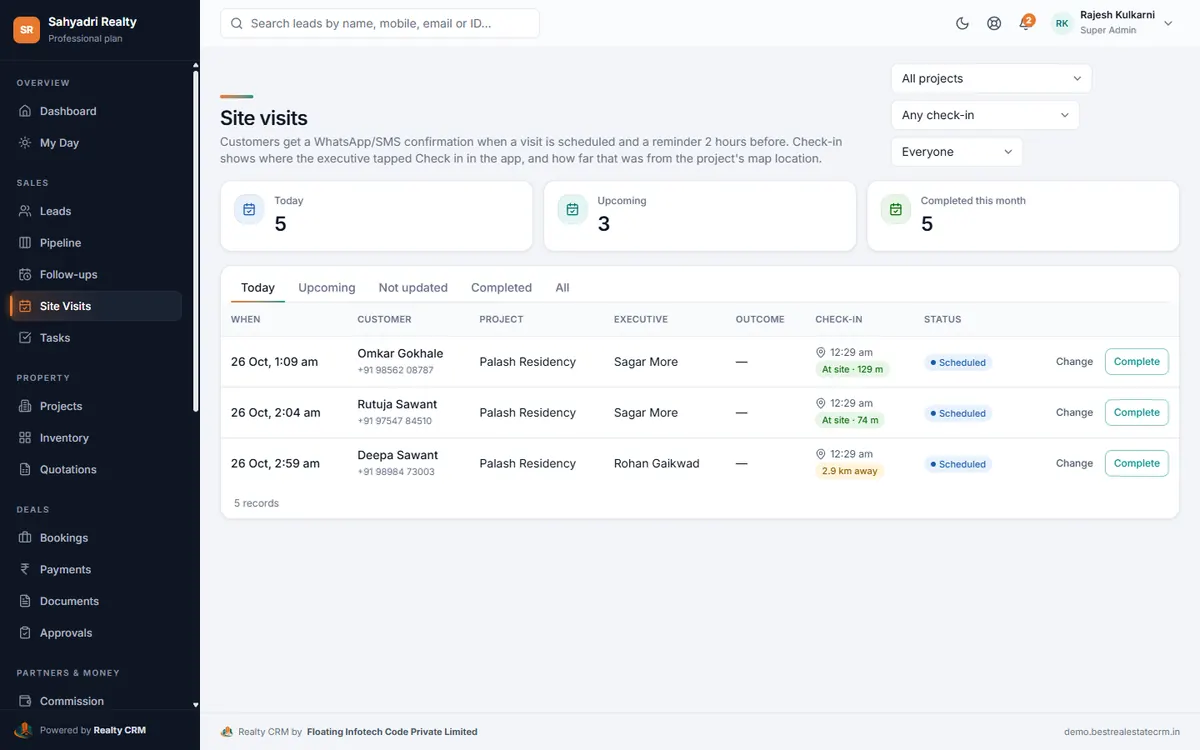
From booking to outcome
Schedule a visit from the lead, pick the project and executive, and the buyer gets a confirmation and a reminder two hours before. After the visit, record the outcome, the buyer's rating and feedback, and the next follow-up.
GPS check-in you can trust
When the salesperson taps Check in in the Android app, the CRM saves the phone's location and works out the distance from the project's map pin.
- At site · 133 m, or 3.0 km away, next to every visit
- A location from a fake-GPS app is flagged
- Each check-in is written on the lead's timeline
- Filter visits by checked in at site, away from site, or no GPS
Visits in your reports
The site visit report lists every visit with its check-in, distance, outcome and feedback, and exports to Excel or PDF.
Set it up, step by step
Questions about site visit management
Does the app track salespeople all day?
No. The location is read only when someone taps Check in, and the app explains this before Android asks for permission.
Is there an iPhone app?
The mobile app is for Android. On an iPhone, the CRM works in the browser.
More of Realty CRM
Android app
The Realty CRM Android app for real estate sales teams: today's calls, follow-ups and site visits, one-tap call and WhatsApp, GPS check-in, projects and inventory.
WhatsApp automation
WhatsApp in your real estate CRM: one-tap chats from every lead, approved templates for welcomes, site visit reminders, payment reminders and booking confirmations.
Sales analytics & reports
Dashboards, targets and 13 reports for real estate sales: lead sources, campaign ROI, executive performance, site visits, bookings, collections and the funnel.